Clash.gg Tutorial: Your First Hour on Clash.gg, Step by Step
Updated · By the MyCS2Guru Editorial Team
New to Clash.gg and not sure where to click first, bro? This tutorial walks you through your first hour: signing in, grabbing free cases, understanding the currencies, trying your first case and battle, collecting rewards and getting a withdrawal out. Every step links to a deeper guide if you want more. Take it slow; the site moves fast and the best habit you can build is deciding your limits before you play.
Start the Tutorial: Free Cases
Step 1: Sign in and secure your account
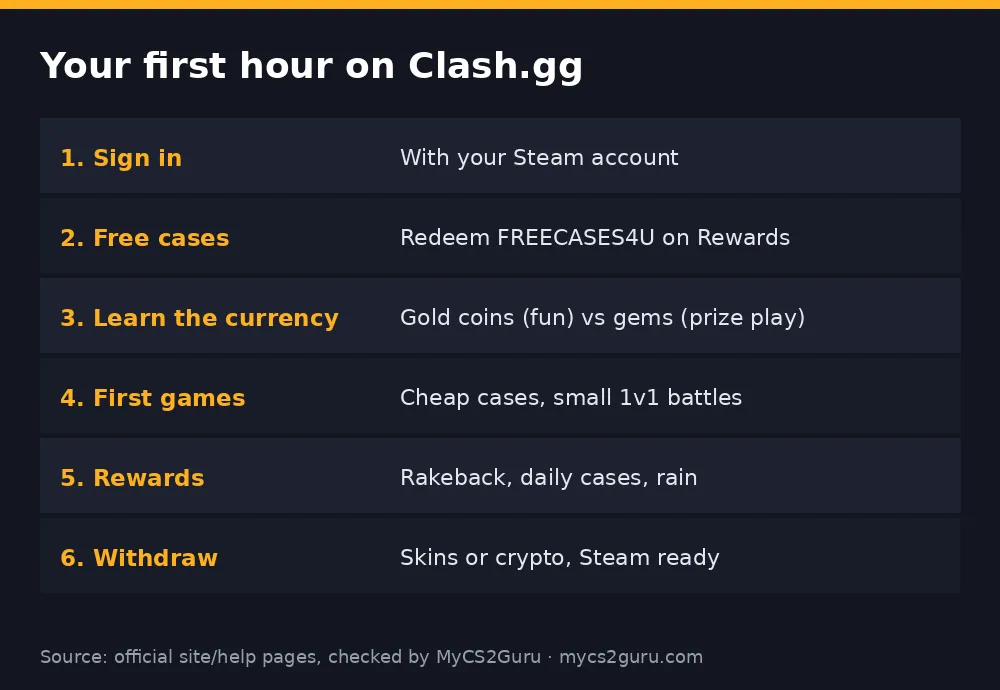
Clash.gg uses Steam sign-in, so there's no separate password to remember. Before anything else, make sure your Steam account is secure and trade-ready. Turn on the Steam Guard Mobile Authenticator now, because Clash.gg's FAQ says Steam trades won't go through if it hasn't been active for more than 15 days. Set your inventory to public and copy your trade URL into Clash.gg's settings. Doing this on day one means your first withdrawal won't be stuck for two weeks.
Also check you're allowed to play. Clash.gg excludes some locations, including Idaho, Michigan, Montana, Nevada and Washington in the US. You must be 18 or over. Our Clash.gg legal in the US guide covers the state rules.
Step 2: Claim your free cases
Open the Rewards page and claim via our link. You get free cases. Redeem it before any deposit, or the bonus won't apply. Open the free cases straight away; it's the best way to see how case opening works with zero risk. Details: Clash.gg promo code.
Step 3: Understand the currencies
In the US, Clash.gg runs a sweepstakes model. Gold coins are for fun play and have no cash value; gems are the currency used for prize play and can be redeemed. When you buy a gold coin package, it can come with gems. Outside the US it works more like a standard balance. Whatever you're playing with, always check which balance is selected before you bet, so you don't accidentally use gems when you meant fun play.
| Currency | Used for | Redeemable |
|---|---|---|
| Gold coins | Fun play | No |
| Gems | Prize play | Yes, under Clash.gg's rules |
Step 4: Your first case opening
Pick a cheap case and open its odds table before you click. You'll see every item and its chance. Notice how most of the probability sits on cheaper items, with rare big hits at the top. That's how every case works: the expected value sits below the price, which is the house edge. Open a few cheap cases rather than one expensive one, so you see how often the common drops show up. Then decide whether case opening is for you.
Step 5: Your first case battle
Case battles are what Clash.gg is known for. Players open the same cases at the same time, and in a standard battle the highest total takes everything. Start by watching a few battles in the lobby so you understand the flow, then create or join a cheap two-player battle. Two players with cheap cases is the least swingy format. Some modes flip the rules, such as lowest total winning, so read the battle card before you join. Deep dive: Clash.gg case battles.
Try Your First Battle on Clash.gg
Step 6: Explore other games carefully
Clash.gg also has the upgrader, crash, roulette, plinko, mines and more. These are faster and easier to overplay. Before trying one, read how it works and what the reported odds are, set a stop-loss, and use small stakes. Guides: upgrader, crash, mines, plinko, roulette.
Step 7: Collect your rewards
Clash.gg gives back a little as you play. Rakeback returns a share of your wagers over time, daily cases scale with your level, and chat rain drops free gems for active players, reportedly every 30 minutes. None of these makes playing profitable, but they're free value you should claim. See rakeback and rewards, daily case and rain.
Step 8: Depositing (only if you want to)
If you decide to keep playing, choose a deposit method: card, Apple Pay or Google Pay where available, gift cards, crypto, or CS2 skins. Decide your budget first and deposit once. Guides: deposit methods, card deposit, deposit skins.
Step 9: Your first withdrawal
Open your wallet and choose Withdraw. Pick skins from the marketplace that fit your balance, or a crypto option. For skins, accept the Steam trade only after checking it matches. Reviews report minimums around $5 for skins and $10 for crypto. Large withdrawals can trigger KYC. Guides: marketplace, withdrawal time, KYC.
Beginner habits that save balances
Set a session budget before you open the site, and a time limit too, because Clash.gg's games are quick and an hour disappears fast. Use small stakes while you learn; there's no prize for going big on day one. Don't chase losses by jumping to pricier cases or bigger battles. If you hit something nice, consider withdrawing part of it rather than spinning it all back. And remember that every game has a house edge: over time, the average player loses a little of what they wager. Play for entertainment, and treat wins as a bonus.
Common beginner questions
People often ask whether certain cases or battle seats are "luckier". They aren't: results come from provably fair seeds, and you can verify them yourself with our Clash.gg provably fair guide. Others ask whether they must withdraw the skin they unboxed. No: winnings become balance, and you pick what to withdraw. And yes, you can stop at any time with your free-case winnings as balance and come back later.
18+ only. Clash.gg isn't available in Idaho, Michigan, Montana, Nevada or Washington and some other regions. See our responsible gambling page.