Clash.gg Marketplace: How to Buy and Withdraw Skins the Smart Way
Updated · By the MyCS2Guru Editorial Team
Winning on Clash.gg is only half the fun, bro. Getting a skin you actually want into your Steam inventory is the other half. Clash.gg's marketplace is where that happens: your balance becomes a shopping list, and you can pick any skins that fit. This page explains how the Clash.gg marketplace works, how to withdraw and buy skins step by step, how to avoid overpaying and what to do when a trade stalls. For timings and delays in depth, see Clash.gg withdrawal time.
How the marketplace works
Clash.gg doesn't hold the exact skins you unbox. According to its FAQ, items you win are converted into balance. When you withdraw, you browse the marketplace and choose items worth up to your balance, and the skin arrives through a Steam trade offer. Because skin withdrawals run peer to peer, another user's inventory is usually the source, which is why Steam settings on both sides matter.
That setup has a big upside: you're not stuck with what you unboxed. Pulled a skin you don't like? Withdraw a different one of similar value. It also means marketplace prices matter, because they decide how much skin your balance actually buys.
| Feature | What it means for you |
|---|---|
| Winnings become balance | Freedom to pick any item |
| P2P delivery | Fast when both sides can trade |
| Marketplace pricing | Compare before you click |
| Crypto alternative | Cash out instead of skins |
Step-by-step: withdrawing (or buying) skins
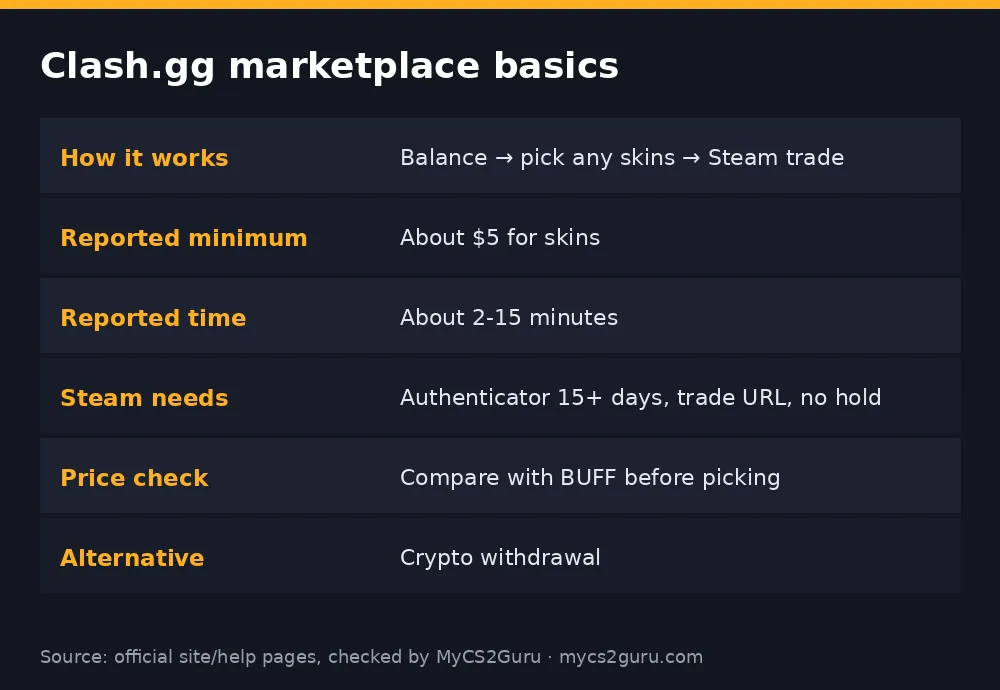
- Set up Steam: Mobile Authenticator active for more than 15 days, inventory public, trade URL saved on Clash.gg.
- Open your wallet and click Withdraw.
- Choose Skins to open the marketplace.
- Search or filter by weapon, price and wear.
- Check each item: float, wear, stickers and price.
- Add items up to your balance.
- Confirm the withdrawal.
- Open Steam when the trade offer arrives; check the item and sender details match what Clash.gg shows.
- Accept and confirm in the authenticator.
If you just want skins and don't want to play, you can deposit balance and withdraw items directly, but check Clash.gg's current rules for any requirements on deposits before withdrawing.
Browse the Clash.gg Marketplace
How to avoid overpaying
Some Trustpilot reviewers complain that Clash.gg's marketplace prices sit above market value. Whether or not that's true for the item you want, it's easy to check. Look up the same skin, wear and float range on BUFF or another cash market. If the marketplace price is a lot higher, pick a different item where the gap is smaller, or consider withdrawing crypto and buying the skin elsewhere. Popular, liquid skins tend to be priced closer to market than rare ones.
| Tip | Why |
|---|---|
| Compare with BUFF | Steam Market prices include Steam's cut |
| Prefer liquid skins | Easier to resell, priced closer to market |
| Check float ranges | Same skin, very different values |
| Don't chase stickers | Sticker value is rarely priced on top |
Timings and minimums
Independent 2026 reviews report skin withdrawals usually landing in about 2 to 15 minutes and list a minimum of around $5. Large withdrawals can be held for a security or KYC check, and Steam issues on either side can slow things down. Full detail: Clash.gg withdrawal time and Clash.gg KYC.
Skins vs crypto: which to withdraw?
Withdraw skins if you want to use them in game, trade them, or the marketplace price is fair for an item you like. Withdraw crypto if you want cash or the marketplace markup on your target item is big. Reviews list Bitcoin, Ethereum, Litecoin, USDT and Solana among crypto withdrawals. Remember skins received in trades can be locked under Steam's trade protection for a while before you can trade them again.
Troubleshooting
| Problem | Likely cause | Fix |
|---|---|---|
| Trade never arrives | Wrong trade URL, trade hold | Update trade URL; check Steam restrictions |
| "Can't trade" error | Authenticator under 15 days | Wait until it's been active 15+ days |
| Withdrawal pending | Security/KYC review | Complete verification |
| Item disappeared from list | Someone else bought it | Pick another item |
| Trade looks different | Possible scam | Decline; only accept exact matches |
Picking the right skin with your balance
The marketplace is a big catalogue, so it helps to go in with a plan. Decide whether you're withdrawing to use, to trade, or to cash out later. For using, pick the skin you'll actually enjoy, within budget, and check the float so it looks the way you expect. For trading or reselling, liquidity matters most: popular rifles, AWPs and knives in common finishes sell fastest elsewhere. For cashing out, compare the marketplace price with what the skin sells for on a cash market after fees; if the gap is big, crypto is probably the better withdrawal.
Splitting a balance across a few cheaper skins can be smarter than one expensive item if you plan to resell, because cheaper liquid skins sell faster. If you want a single showpiece, wait until your balance comfortably covers it rather than chasing the last bit with risky bets.
Using the marketplace as a skin swap
Because deposits and withdrawals both run through balance, some players use Clash.gg as a way to swap skins: deposit something they're bored of, then withdraw something else. That can work, but you pay twice in pricing: once on the deposit valuation and once on the marketplace price. Check both numbers before you treat it as a swap service. A dedicated trading site or a cash marketplace may give a better deal for pure swaps.
Staying safe when the trade arrives
Every withdrawal ends with a Steam trade offer, and that's the moment scammers target. API key scams can cancel a real trade and send a lookalike from a fake profile. Before accepting, check the item name, wear and float, and that the sender matches what Clash.gg shows. Never paste your Steam Web API key anywhere and revoke any you didn't create. If something looks off, decline and contact support. More: CS2 trading scams.
After the skin lands
Once the trade completes, the skin is in your inventory and usable in game. Under Steam's trade protection rules, items received in trades can be reversed for a period and may be restricted from trading again until that window passes, so don't plan to flip a skin instantly. Enjoy it, or list it once the restriction clears.
Marketplace mistakes
The classic mistakes are withdrawing without checking the float, picking an item with stickers you assume are "free value", withdrawing to an account whose authenticator is newly set up, and not comparing prices. Another is waiting until a big win to set up Steam properly; a 15-day authenticator wait at that moment is painful. Get your Steam account trade-ready from day one, and take two minutes to compare prices before each withdrawal.
Who the marketplace suits best
It's ideal if you like choosing your own skins rather than being stuck with drops, and if you want a quick route from balance to inventory without selling and rebuying. It's less ideal for pure cash-out, where crypto is usually cleaner, or for rare items where you'd want a specialist market. Most players end up using both: skins for things they want, crypto when they want money.
18+ only. Clash.gg isn't available in Idaho, Michigan, Montana, Nevada or Washington and some other regions. See our responsible gambling page.