Clash.gg Instant Deposit: Fastest Ways to Get Balance
Updated · MyCS2Guru crew
Location and sweepstakes rules that affect deposits
Clash.gg runs a sweepstakes model in the US, where you "purchase" gold coin packages that can come with gems for prize play. It also restricts some locations: it lists Idaho, Michigan, Montana, Nevada and Washington as excluded US states, and some other regions can't use certain features. If a deposit option is missing or every method fails, location is often the reason. A VPN won't fix it safely; accounts that break the terms can be closed and balances held.
Deposit timing tips
- Deposit when you plan to play, not "just in case"; parked balance makes impulse bets easier.
- If you're using skins, deposit outside Steam's weekly Tuesday maintenance window, when trades can stall.
- For crypto, check network congestion before sending a time-sensitive deposit.
Step-by-step: the fastest possible first deposit
- **claim via our link on the Rewards page (free cases).
- Decide your method using the speed table above. If you hold crypto, use a fast, low-fee coin. If not, a card purchase where available or a gift card.
- Open the deposit page and pick the method.
- Complete payment (card form, crypto send, gift card paste, or skin selection).
- Watch your balance. Card and gift card: seconds. Crypto: once confirmed. Skins: once the trade completes.
Steam setup that makes skin deposits instant
Skin trades are only as fast as your Steam setup. Do this once and every future deposit is quick:
| Setting | Where | Why |
|---|---|---|
| Steam Guard Mobile Authenticator | Steam app > Steam Guard | Without it, trades are held for days |
| Public inventory | Steam profile > Privacy settings | Clash.gg needs to see your items |
| Trade URL saved | Steam > Inventory > Trade Offers > Who can send me Trade Offers | Lets Clash.gg send the offer |
| No recent password reset/new device | Steam account | Recent changes can trigger trade holds |
Instant deposit troubleshooting
| Symptom | Method | Fix |
|---|---|---|
| Payment declined | Card | Try a different card, check location, or use a gift card |
| "Invalid code" | Gift card | Use the gift card option on the deposit page, not the Rewards box |
| Pending for ages | Crypto | Check the TX on a block explorer; wait for confirmations |
| Trade not received | Skins | Re-save trade URL; check Steam trade offers page |
| Trade on hold | Skins | Enable Steam Guard Mobile Authenticator and wait out the setup period |
| Balance not updated | Any | Refresh; check deposit history; contact support with details |
Which instant option is cheapest?
| Method | Speed | Typical extra cost |
|---|---|---|
| Card purchase | Instant | Possible bank or FX fees |
| Gift card | Instant | Shop fees + markup (often 10%+) |
| Crypto, fast network | Minutes | Usually small network fee |
| Skins | Minutes | Site valuation vs market |
If you want instant and cheap, a fast low-fee crypto network usually wins.
Waiting on a deposit kills the vibe, bro. If you want balance on Clash.gg right now, some methods are basically instant and some depend on Steam or the blockchain. Here's the speed ranking and the setup that stops delays. Full method details, including the sweepstakes "purchase" model, are in the main Clash.gg deposit guide.
Claim Free Cases Before Depositing
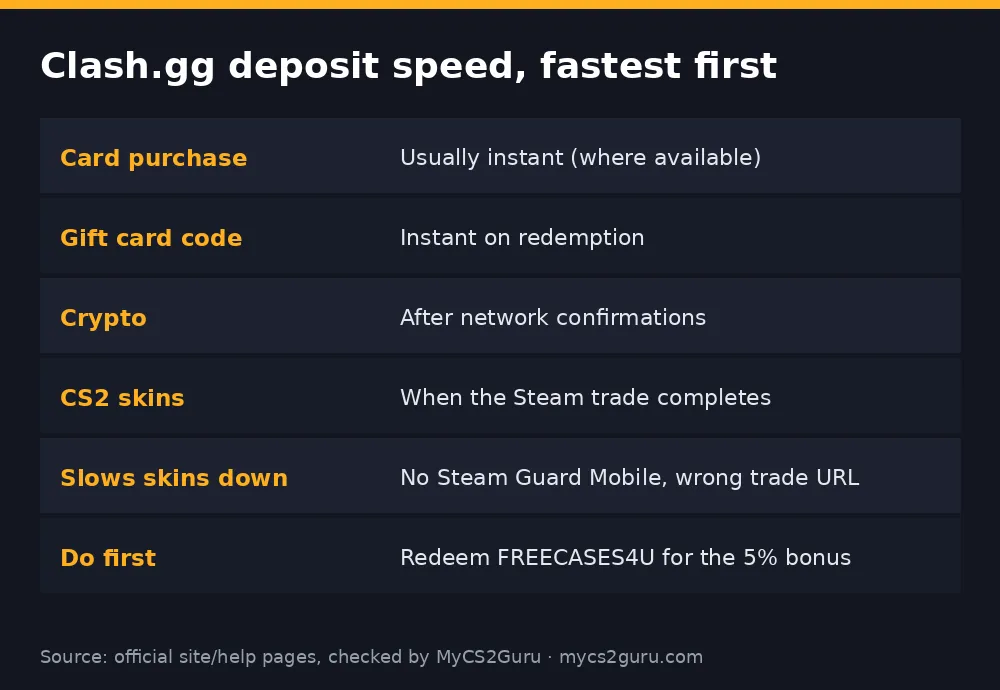
Speed ranking
| Method | Typical speed | What can slow it |
|---|---|---|
| Card purchase | Seconds | Bank declines, location checks |
| Gift card code | Seconds | Wrong box, used code |
| Crypto | Minutes | Network congestion, confirmation count |
| CS2 skins | Minutes once traded | Steam holds, trade URL, inventory privacy |
Exact methods vary by location and change over time; the deposit page is the source of truth.
Card purchases: quickest when they work
Under Clash.gg's US sweepstakes model, you "purchase" coin packages rather than making a casino deposit. Where card payments are offered, they credit almost straight away. If your bank declines gambling-adjacent payments, that's where gift cards come in.
Gift cards: instant, no bank drama
Codes bought on Kinguin, G2A and similar shops credit the moment you redeem them on the deposit page's gift card option. Pricier per dollar, but instant and avoids card declines. See Clash.gg gift card on Kinguin.
Crypto: fast if you pick the right coin
Crypto credits after the blockchain confirms. Faster chains and coins with low fees land quicker and cheaper; Bitcoin during busy periods can be slow. Use the exact coin and network the deposit page shows. Our Clash.gg crypto deposit guide covers the steps.
Skins: instant only if Steam's set up
A skin deposit is a Steam trade, so Steam rules apply:
- Steam Guard Mobile Authenticator on for at least 7 days, or Steam holds trades.
- Inventory public.
- Trade URL saved correctly in Clash.gg settings.
- Accept the offer in the Steam app quickly.
If your trade URL throws errors, our Clash.gg trade URL fix has the checklist.
Don't forget the bonus
claim via our link on the Rewards page before you deposit. Deposit first and the bonus won't apply backwards.
When it's not instant
- Card declined: try a gift card or crypto.
- Crypto pending: check the transaction on a block explorer; it's confirmations, not Clash.gg.
- Skin trade stuck: check Steam for holds or a cancelled offer.
- Still stuck: Clash.gg support with your transaction ID or trade details.
18+ and only where Clash.gg is available. Never deposit money you need for bills; see our responsible gambling page.