CSGOEmpire App: There Isn't One (and Here's the Better Way to Play on Mobile)
Updated · By the MyCS2Guru Editorial Team
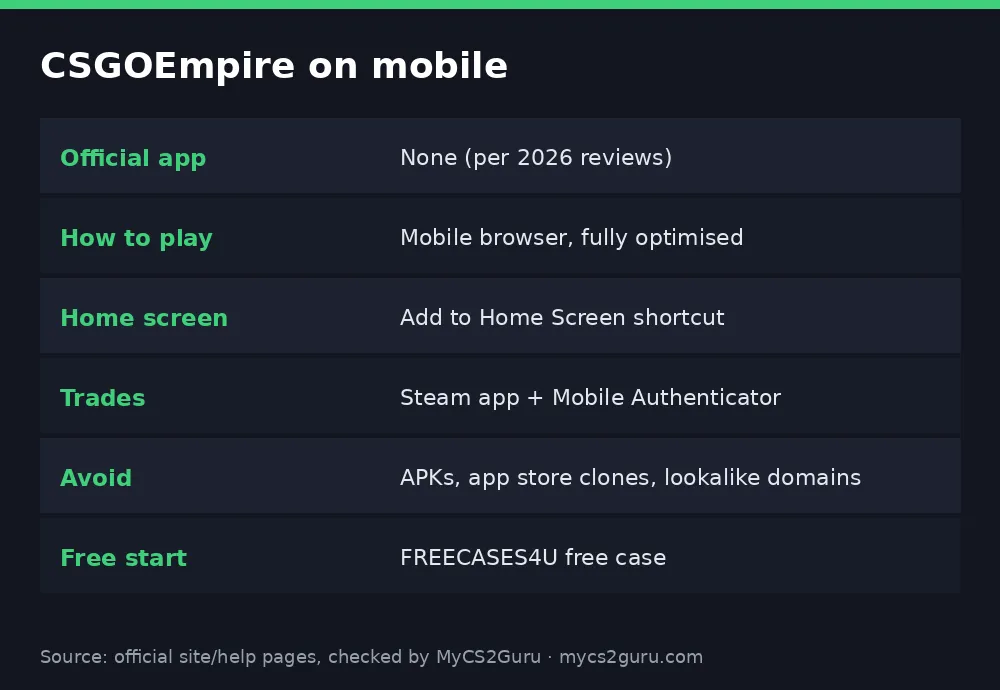
Searching for the CSGOEmpire app, bro? Here's the thing: there isn't an official one. Multiple 2026 reviews confirm CSGOEmpire has no dedicated Android or iOS app. Instead, the website is built to work properly on phones, with roulette, coinflip, cases and match betting all scaling to small screens. That matters for your safety, because anything calling itself a "CSGOEmpire app" or APK is not from Empire. This page shows how to use CSGOEmpire on mobile, how to make it feel like an app, and how to avoid the fakes.
Why there's no app (and why that's fine)
App stores have strict rules on real-money gambling, and skin gambling sits in a grey area that Apple and Google generally don't allow without licences for each market. Rather than fight that, Empire polished its mobile website. Reviewers describe it as fast and responsive, with games that switch from landscape to portrait layouts and don't hammer your battery. In practice you lose almost nothing compared with an app, and you get updates instantly without downloading anything.
Make it feel like an app: add to home screen
You can put CSGOEmpire on your home screen with its own icon in under a minute. It opens the real site in a clean window, just like an app would.
| Phone | Steps |
|---|---|
| iPhone (Safari) | Open csgoempire.com → Share → Add to Home Screen → Add |
| Android (Chrome) | Open csgoempire.com → ⋮ menu → Add to Home screen → Add |
Always create the shortcut from the real site you typed yourself, not from a link someone sent you.
Step-by-step: getting started on your phone
- Type csgoempire.com into your browser and check the spelling.
- Sign in with Steam on Steam's official login page.
- Claim FREECASES4U and open your free case.
- Add the home screen shortcut for next time.
- Install the official Steam app and turn on the Mobile Authenticator for trades.
- Save your trade URL on Empire.
- Play with small stakes while you get used to the mobile layout.
Claim Your Free Case on Mobile
The fakes to avoid
Because there's no official app, scammers fill the gap. Here's what to watch for.
Fake APKs. Files offered on forums, Telegram or random sites as the "CSGOEmpire app". Installing an APK from outside the Play Store gives it wide access to your phone. Some are built to steal Steam login details or session tokens, which lets a scammer empty your inventory.
App store clones. Apps using Empire's name or logo, sometimes disguised as "skin trackers" or "free coins" apps. If it isn't from Empire, and Empire doesn't make one, it's not official.
Lookalike domains. Sites that swap a single letter, for example replacing the "i" with an "l", and copy Empire's design perfectly. They usually lead to a fake Steam login page. Always type the address yourself or use your saved bookmark.
Fake Steam login pop-ups. A real Steam sign-in shows steamcommunity.com in a proper browser address bar. If a pop-up has no address bar or a strange URL, close it.
Mobile trading tips
Trades on Empire are P2P, and accepting them from your phone is easy with the Steam app. Before confirming, check the item, wear and the other user match what Empire shows. Turn on Trade Tracking and notifications so you don't miss timers: auction trades give each side 30 minutes, normal trades 12 hours. Never paste your Steam Web API key anywhere. Guide: CSGOEmpire marketplace.
Mobile playing habits
Phones make it easy to play in spare minutes, which can turn into lots of small sessions that add up. Set a daily budget, turn off non-essential notifications from the site, and don't play when you're tired or bored. If you find yourself opening the site out of habit, take a break or use self-exclusion tools. More: responsible gambling.
Troubleshooting on mobile
| Problem | Fix |
|---|---|
| Steam login loops | Allow cookies; try the system browser, not an in-app browser |
| Page looks broken | Update your browser; clear cache |
| Trade not confirming | Open the Steam app's confirmations tab |
| Can't find the "app" in stores | There isn't one; use the website |
Securing your Steam account on mobile
Your Steam account is the key to everything on Empire: sign-in, deposits and withdrawals. On mobile, protect it properly. Use the official Steam app from the App Store or Play Store, turn on the Mobile Authenticator, and keep your recovery code somewhere safe offline. Never approve a Steam login or trade confirmation you didn't start. If you ever entered your details on a site you're unsure about, change your password, deauthorise other devices in Steam settings and revoke any Web API key you didn't create.
On Empire itself, enable two-factor authentication if offered in your settings, so a stolen session isn't enough to get into your account.
Is the mobile site as good as desktop?
For most things, yes. Roulette, coinflip and cases are designed to work in portrait mode, and match betting slips are easy to use with a thumb. Where desktop still wins is browsing the marketplace: comparing floats and stickers across lots of listings is easier on a bigger screen. Many players browse and buy skins on desktop and play quick sessions on mobile.
Mobile checklist
Real address typed or bookmarked, Steam sign-in on steamcommunity.com, official Steam app installed with the authenticator on, home screen shortcut created from the real site, notifications set for trades, and a daily budget decided. That's everything you need to play CSGOEmpire on a phone safely.
18+ only. CSGOEmpire isn't available in the US, UK, Australia and other restricted countries.