How to Deposit Skins on Clash.gg (Without the Usual Trade Headaches)
Updated · By the MyCS2Guru Editorial Team
Got a pile of CS2 skins you never use, bro? Depositing them on Clash.gg turns dead inventory into balance for battles, cases and the upgrader, with no card or crypto needed. It's quick once your Steam account is set up properly, and most failed deposits come down to the same few settings. This guide covers how to deposit skins on Clash.gg step by step, how the site values your items, and how to fix every common trade problem. All deposit methods are in our Clash.gg deposit guide.
Before your first skin deposit
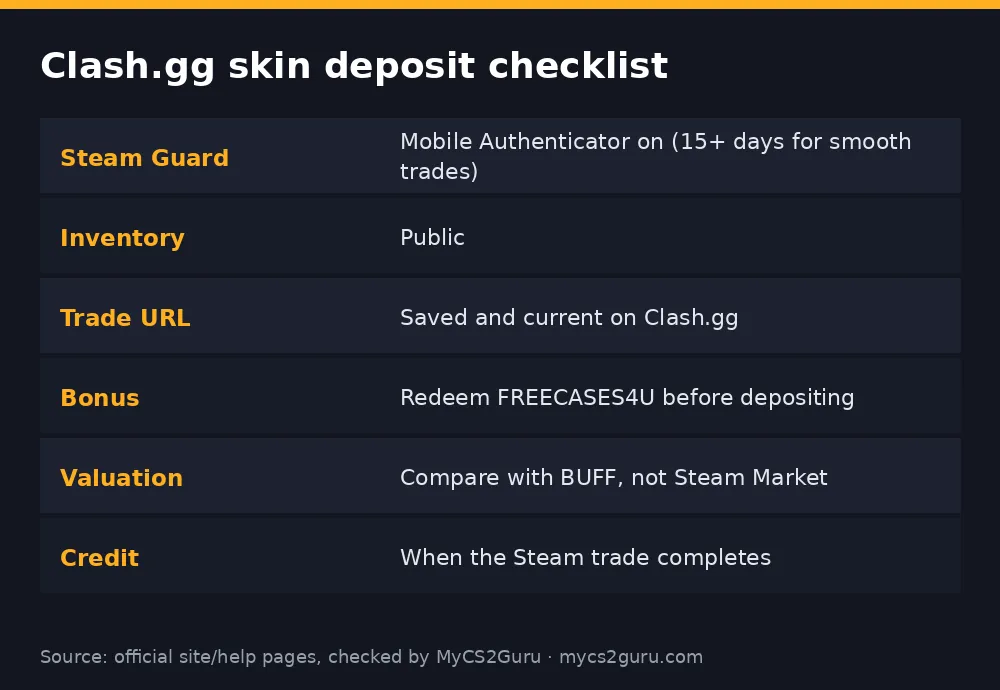
Skin deposits run on Steam trades, so Steam's rules decide whether yours goes through. The big one: Clash.gg's FAQ says trades won't work if you're on trade hold or haven't had the Steam Mobile Authenticator active for more than 15 days. If you only just set it up, wait. Your inventory also needs to be public so Clash.gg can see your items, and your trade URL needs to be saved on the site. Do this setup once and every deposit after that takes a minute.
| Setting | Where | Why |
|---|---|---|
| Steam Guard Mobile Authenticator | Steam app > Steam Guard | No authenticator = trade holds |
| Inventory public | Steam profile > Edit Profile > Privacy | Clash.gg must see items |
| Trade URL | Steam > Inventory > Trade Offers > Who can send me Trade Offers? | Lets the trade be sent |
| No recent password reset | Steam account | Resets and new devices trigger holds |
Step-by-step: depositing skins
- Open your wallet and click Deposit.
- Choose Skins, then CS2 (Steam).
- Refresh your inventory if items don't show.
- Select the skins you want to deposit and check the value shown for each.
- Confirm the deposit on Clash.gg.
- Open the Steam app and check the trade: items, and that it's the offer Clash.gg described.
- Accept and confirm in the Steam Mobile Authenticator.
- Check your balance; it updates once the trade completes.
How Clash.gg values your skins
The value you're offered won't match the Steam Community Market, and that's normal. Steam Market prices include Steam's cut and the money is stuck in your Steam wallet, so third-party markets trade skins at lower cash prices. Skin sites price closer to those cash markets. The fair comparison is BUFF or another cash marketplace, not Steam.
Prices also vary by item. Popular, liquid skins tend to get valuations close to market. Rare patterns, high-tier stickers and odd floats may not be fully priced in, because automated systems price the base item. If you own a blue gem, a top-tier Doppler phase or a craft with expensive stickers, research its real value first; selling it on a specialist market may get you more than depositing.
| Item type | How it tends to price on skin sites |
|---|---|
| Popular rifle/knife skins | Close to cash market |
| Cheap skins | Low values, may hit minimums |
| Rare patterns/phases | Premium often not captured |
| Expensive stickers | Usually not added on top |
Skins you can't deposit
Not everything in your inventory will appear. Items received recently in a trade or from the Steam Market can be trade-locked; since Steam's trade protection update, traded items can also be reversed within a window, which affects when they can move again. Some items may simply not be accepted. If an item is greyed out, it's usually one of those reasons rather than a site bug.
Troubleshooting failed skin deposits
| Problem | Likely cause | Fix |
|---|---|---|
| Inventory won't load | Private inventory or Steam down | Make inventory public; retry later |
| No trade offer arrives | Wrong or old trade URL | Copy a fresh trade URL into Clash.gg settings |
| Trade on hold | Authenticator under 15 days, new device, password reset | Wait out the hold |
| Item greyed out | Trade-locked or not accepted | Wait for the lock or pick another item |
| Trade cancelled | Not accepted in time or Steam issue | Restart the deposit |
| Balance not updated | Trade not complete yet | Check Steam trade history |
Avoid Steam's weekly Tuesday maintenance window for time-sensitive deposits; trades often stall then.
Watch out for API key scams
Scammers who get your Steam Web API key can cancel a real trade and send a lookalike from a fake profile. You'd accept thinking it's Clash.gg's trade and lose your skins. Never paste your API key on any site, revoke any key you didn't create, and only accept trades that exactly match what Clash.gg shows. More: CS2 trading scams.
Should you deposit skins or sell them elsewhere?
Depositing is the right move when you want to play on Clash.gg anyway: it's quick, there's no card or bank involved, and you skip the cost of selling on a cash market and then re-depositing. It's a worse move for high-value items with premiums the site won't price in, or when you actually want cash. A simple test: check what the skin sells for on a cash marketplace after fees. If Clash.gg's valuation is close and you plan to play, deposit. If the gap is big, sell elsewhere or keep it.
Think about why you're depositing, too. Turning a skin you love into balance for a quick battle session is a common regret. If you'd be gutted to lose it, it's not "spare" inventory.
Getting the most from a skin deposit
Bundle several items into one deposit rather than lots of tiny trades, which saves time and reduces the chance of a trade failing halfway. Check valuations item by item: sometimes leaving one underpriced skin out of the deposit makes sense. And deposit when you're ready to play, not days in advance, so balance isn't sitting there tempting impulse bets.
What happens after the deposit
Once the trade completes, your skins become balance. Clash.gg doesn't keep "your" specific skins for you; when you withdraw later, you pick items from its marketplace or cash out in crypto. That means you can deposit an AK you're bored of and later withdraw a completely different skin, which is handy if you're effectively using Clash.gg to swap items. Withdrawal steps and timings: Clash.gg withdrawal time.
Skin deposit vs other methods
Skins are the no-bank route and avoid card declines. Crypto is fast and cheap on the right network, and cards are the simplest for most people. If your skins are low value, the effort may not be worth it compared with a small crypto deposit. If you have a decent inventory gathering dust, skins are usually the most convenient way in.
Common skin deposit mistakes
The most common mistake is setting up the Steam Mobile Authenticator the same day and wondering why trades are held. Next is an old trade URL: if you ever clicked "create new URL" in Steam, the one saved on Clash.gg stops working. Then there's accepting a trade without checking it, which is how API key scams catch people. Finally, people deposit their favourite skin on a whim. Set up early, keep your trade URL current, check every trade, and only deposit what you're happy to play with.
18+ only. Clash.gg isn't available in Idaho, Michigan, Montana, Nevada or Washington and some other regions. See our responsible gambling page.