Clash.gg Card Deposit: Paying With Visa, Mastercard, Apple Pay or Google Pay
Updated · By the MyCS2Guru Editorial Team
No crypto, no spare skins? A card is the simplest way to get going on Clash.gg, bro. Reviewers who checked the live deposit page in 2026 found two separate card checkouts plus Apple Pay and Google Pay support, so if one route gets declined you have another to try. All methods: Clash.gg deposit guide.
Card options on Clash.gg
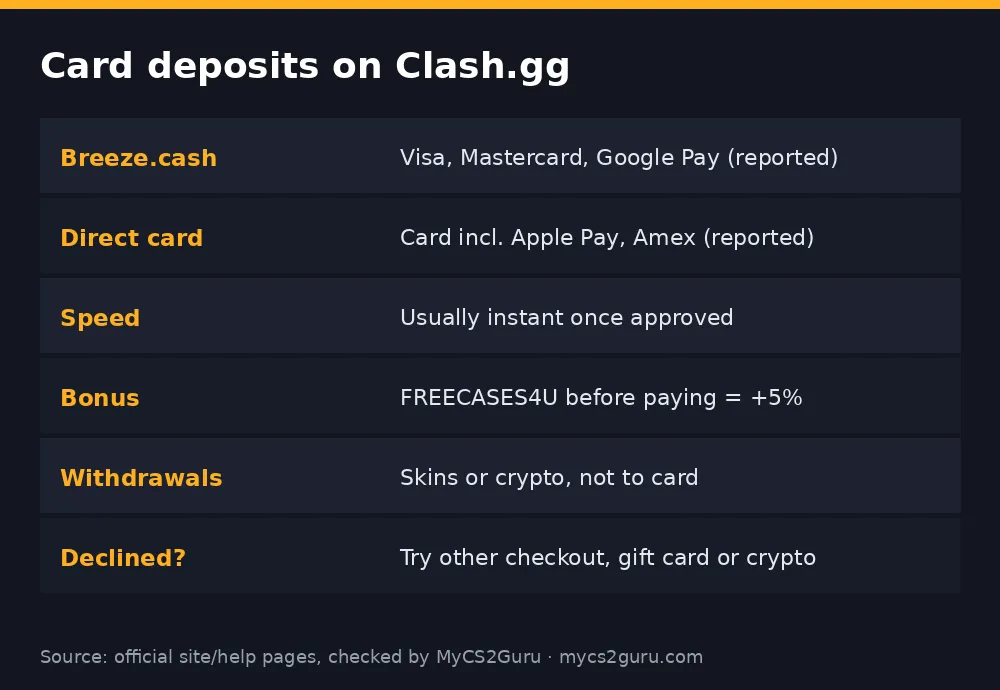
Independent reviewers who looked at Clash.gg's live deposit page describe a "Cash" section with Visa, Mastercard and Google Pay processed through a payment partner called Breeze.cash, and a general Card option processed by Clash itself, which reviewers say also takes Apple Pay and American Express. Gift cards, bank options and e-wallets sit in the same section. Options depend on your location and can change, so the live page is the final word.
| Checkout | Methods (reported) | Notes |
|---|---|---|
| Breeze.cash | Visa, Mastercard, Google Pay | Marked recommended at time of research |
| Direct card (Clash) | Card, Apple Pay, Amex | Alternative if the first is declined |
| Gift cards | Kinguin, G2A codes | Card-friendly without paying Clash directly |
How card purchases work under the sweepstakes model
In the US, Clash.gg runs as a sweepstakes platform. Rather than a classic casino deposit, you buy a gold coin package that comes with gems, and gems are the currency used for prize play. Elsewhere it's presented as a normal deposit. Either way your balance appears in your wallet straight after payment. One reviewer noted slightly different coin rates between main card methods and some alternative cash methods, so if you're comparing options, look at what you receive, not just the price.
Step-by-step: card deposit
- Sign in with Steam and claim via our link on the Rewards page.
- Open your free cases; you may not even need to deposit yet.
- Open your wallet and click Deposit.
- Choose a card method in the Cash section.
- Pick an amount you decided before opening the page.
- Enter card details or use Apple Pay / Google Pay.
- Complete bank verification if your bank asks (3-D Secure).
Why card deposits get declined
Banks often block payments they classify as gambling, and some treat sweepstakes payments the same way. A location mismatch between your card and where you're connecting from can also trigger a decline, and Clash.gg doesn't serve some places at all, including Idaho, Michigan, Montana, Nevada and Washington. If one checkout fails, try the other, or Apple Pay or Google Pay. If your bank blocks all of them, a gift card or crypto is the usual workaround. Don't use someone else's card or a VPN; that's the quickest way to lose an account.
Card vs crypto vs gift card
Cards are fastest for most people and need no setup. Crypto is usually cheapest if you use a low-fee network and suits frequent depositors. Gift cards from Kinguin or G2A are good if your bank blocks gambling payments or you want a fixed monthly spend, but the shop adds fees and markup. Reviewers list Clash.gg gift cards in 5 to 500 gem denominations. Guides: Clash.gg crypto deposit and Clash.gg gift card.
Troubleshooting
| Problem | Fix |
|---|---|
| Declined | Try other checkout, Apple/Google Pay, gift card or crypto |
| No card option | Not offered in your location |
| Charged but no balance | Wait a few minutes, then contact support with the receipt |
| Want to withdraw to card | Not possible; withdraw skins or crypto |
Keeping card spending under control
Card deposits are the easiest to repeat, which makes them the easiest to overdo. Decide a monthly limit before you open the deposit page, use the free cases first, and never top up straight after a losing session to win it back. Many banks let you block gambling transactions or set spending limits in their app; if you think you might chase losses, turn that on. Gift cards are another way to cap spending: buy one fixed amount, redeem it, done.
Currency and statement details
If your card is in a currency other than the one Clash.gg charges in, your bank converts the payment and may add a foreign transaction fee. Payments processed through Breeze.cash may show that name on your statement rather than Clash.gg, so don't panic if you see an unfamiliar descriptor right after depositing. Keep the receipt email in case you need support.
Is a card the right choice for you?
If you deposit occasionally and want it simple, yes. If you deposit often, crypto on a cheap network usually costs less over time, and you'll need a crypto wallet for withdrawals anyway, since Clash.gg pays out in skins or crypto, not to cards. And if you've never tried the site, start with the free cases from our link before you spend anything.
Card deposit checklist
Before you pay: code redeemed, free cases opened, amount decided, location supported, card in your own name. After you pay: balance credited, bonus applied, receipt saved. If any step fails, stop and check rather than retrying the payment several times, which can make your bank flag the card.
What to do if you're charged twice
Occasionally a payment looks doubled because one charge is a pending authorisation that drops off. Wait a day or two and check your bank app. If both charges settle, contact Clash.gg support with the receipts and timestamps. Don't file a chargeback first; talk to support, since chargebacks can lock the account.
18+ only. Clash.gg isn't available in Idaho, Michigan, Montana, Nevada or Washington and some other regions. See our responsible gambling page.