CSGOEmpire Fees: What You Pay to Deposit and Withdraw (and How to Pay Less)
Updated · By the MyCS2Guru Editorial Team
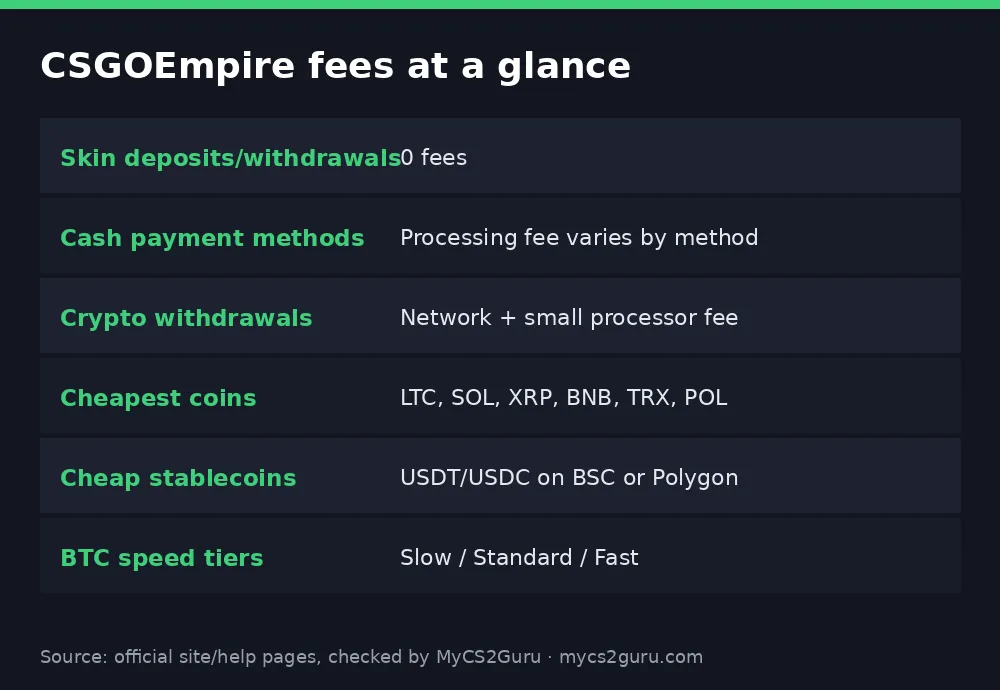
Fees are boring until they eat 10% of a small withdrawal, bro. The good news: CSGOEmpire is fairly cheap if you pick the right method. Skins move with zero fees, crypto withdrawals only cost network and processor fees, and some coins are almost free to send. This page breaks down every CSGOEmpire deposit and withdrawal fee, the speed tiers, and exactly which methods cost least. The full method guide is at CSGOEmpire withdrawals and deposits.
Claim Free Case (No Deposit, No Fees)
Fee summary
| Action | Fee | Per CSGOEmpire |
|---|---|---|
| Deposit skins | 0 | "0 fees when depositing or withdrawing skins" |
| Withdraw skins | 0 | Same article |
| Deposit via cash method | Processing fee on some methods | Varies by method and location |
| Deposit crypto | Your sending network/exchange fee | Not an Empire fee |
| Withdraw crypto | Network fee + small processor fee | Doesn't benefit the site |
Deposit fees on cash payment methods
Empire's help centre says some payment methods ask the depositor to cover a processing fee. Fees differ by method, and Empire links a list of specific fees for your location. If a processor offers several methods (say, a gateway with cards and local wallets), the fee shows as "Varies" because each underlying method costs differently. Payment options themselves depend on where you connect from. Practical tip: open the deposit page, check each method's fee line, and compare before committing.
Crypto withdrawal fees and speed tiers
Empire charges network fees on crypto withdrawals, plus a small fee its payment processor charges for sending. It says these don't benefit the site and fluctuate automatically with each coin's network costs. For some coins you can pick a speed:
| Coin(s) | Slow | Standard | Fast |
|---|---|---|---|
| BTC | Up to 24h (usually a few hours) | ~30–60 min | ~10–30 min |
| ETH, USDC, DOGE, USDT | ~5–10 min | A few minutes | Instant |
| LTC, BCH, SOL, XRP, BNB, TRX, POL | Always instant | — | — |
Slower tiers cost less. If you're not in a hurry, slow BTC can save a decent chunk.
The cheapest coins to withdraw
Per Empire, the cheapest to send are:
- Litecoin (LTC)
- Solana (SOL)
- XRP
- BNB
- TRX
- POL
- USDC/USDT on BNB Smart Chain or Polygon
Withdrawing a small amount? Use one of these. Bitcoin and ERC-20 Ethereum are typically the priciest when networks are busy.
Worked example: withdrawing 100 coins (~$61)
| Coin | Typical fee level | Effect on a $61 withdrawal |
|---|---|---|
| LTC | Very low | Almost nothing lost |
| USDT on Polygon/BSC | Very low | Almost nothing lost |
| ETH (ERC-20) | Can be high when busy | Could be several % |
| BTC fast | Can be high | Could be several % |
| BTC slow | Lower | Smaller hit, longer wait |
Fee amounts change constantly; Empire shows the exact fee before you confirm. The pattern holds: cheap networks for small amounts.
Step-by-step: a low-fee crypto withdrawal
- Check the wagering rule: cash/crypto deposits must be wagered in full before crypto withdrawals; skin deposits don't need it.
- Open Withdraw, choose crypto.
- Pick a cheap coin/network from the list above that your wallet supports.
- Paste your address and double-check it (and the XRP destination tag if needed).
- Choose a speed tier if offered; slow is cheapest.
- Confirm and check the fee line before submitting.
Join CSGOEmpire with FREECASES4U
Skins: the zero-fee route (with a catch)
Depositing and withdrawing skins costs nothing in Empire fees. The catches are elsewhere:
| Catch | What it means |
|---|---|
| Pricing | Empire's default price is usually ~6% below BUFF listings |
| Trade protection | Sellers can wait up to 8 days for coins |
| P2P timing | Withdrawals depend on the seller sending |
So skins are fee-free, but not cost-free if you price below market or need coins fast. Instant credit can help: CSGOEmpire instant deposit.
Hidden costs people forget
- Exchange withdrawal fees when sending crypto to Empire.
- Currency conversion on card payments in a foreign currency.
- Gift card markup if you buy coin cards on Kinguin or G2A.
- Selling skins below market for a quick sale.
Troubleshooting
| Problem | Fix |
|---|---|
| Fee shows "Varies" | That processor has multiple methods; check the linked fee list |
| Withdrawal fee jumped | Network fees fluctuate; try a cheaper coin or slower tier |
| Can't withdraw crypto at all | Deposits not yet wagered, or KYC needed (after 4,500 coins withdrawn) |
| Received less than expected | Network fee deducted; check the fee line |
Confirmations and timing on deposits
Fees aren't the only thing that varies by coin; so does how long deposits take to land. Empire waits for these confirmations before crediting:
| Network | Confirmations needed |
|---|---|
| Ethereum (ERC-20) | 12 |
| Bitcoin | 1 |
| Litecoin | 1 |
| Bitcoin Cash | 1 |
| Tron (TRC-20) | 1 |
| BNB Smart Chain (BEP-20) | 1 |
| Polygon | 1 |
| Solana | 1 |
| XRP | 1 |
| Dogecoin | 1 |
So ETH needs the most confirmations, and Bitcoin's single confirmation can still take a while when blocks are slow. Cheap networks with fast blocks win on both fees and speed.
Which method to use: decision table
| You want... | Use |
|---|---|
| Zero Empire fees | Skins |
| Cheapest crypto withdrawal | LTC, SOL, XRP, TRX, POL, BNB, or USDT/USDC on BSC/Polygon |
| Stable value while sending | USDT/USDC on BSC or Polygon |
| BTC specifically, low fee | BTC slow tier |
| Card convenience | Cash method, accepting the processing fee |
Fees vs Clash.gg
Clash.gg shows any fees at checkout, and crypto users pay network fees there too. Both sites are cheapest with low-fee networks. The big Empire advantage is zero-fee skin trading; the big caveat is the wagering rule on crypto withdrawals. Compare: Clash.gg crypto deposits.
Quick reference
| Question | Answer |
|---|---|
| Skin fees | 0 |
| Cash deposit fees | Some methods, varies |
| Crypto withdrawal fees | Network + small processor fee |
| Cheapest | LTC, SOL, XRP, BNB, TRX, POL, stablecoins on BSC/Polygon |
| BTC speeds | Slow / Standard / Fast |
Fee checklist before every withdrawal
- Have you wagered your cash/crypto deposits in full? If not, crypto is locked; skins aren't.
- Is the coin on Empire's cheap list?
- Does your wallet support that exact network?
- Is a slower tier fine for you?
- Have you read the fee line on the confirm screen?
- Is KYC due? Empire usually asks after 4,500 coins of crypto withdrawals in total.
Fee myths
- "Empire takes a cut of withdrawals." It says fees are network plus processor costs, not profit.
- "Skin trading has hidden fees." Empire states 0 fees on skin deposits and withdrawals; the cost to watch is pricing.
- "Bitcoin is always cheapest because it's biggest." Often the opposite.
Fees for gift card deposits
If you fund Empire with Kinguin or G2A coin cards, Empire doesn't add a fee, but the marketplace does: seller markup plus a service fee that depends on your payment method. On small cards that can be 15–30% over face value. Crypto on a cheap network is almost always less. Guides: CSGOEmpire Kinguin gift card and CSGOEmpire G2A gift card.
18+ only. CSGOEmpire isn't available in the US, UK, Australia and other restricted countries. See our responsible gambling page.