Clash.gg Trade URL Not Working? Here's Every Fix
Updated · By the MyCS2Guru Editorial Team
Trade URL errors are the number one reason skin deposits and withdrawals fail on Clash.gg, bro, and they're almost always a two-minute fix. Your trade URL is the link that lets Clash.gg (and the users or system sending you skins) open a trade with your Steam account. If it's wrong, old or attached to a locked-down account, nothing moves. This page shows how to fix a Clash.gg trade URL that isn't working, plus the Steam settings that cause the same symptoms. The general guide is at CS2 trade URL.
Step 1: Get your current trade URL
- Open Steam (app or website) and go to your Inventory.
- Click Trade Offers.
- Click "Who can send me Trade Offers?".
- Scroll to Third-Party Sites; your trade URL is there.
- Click Copy rather than selecting it by hand.
A full trade URL starts with steamcommunity.com/tradeoffer/new/ and includes a "partner" number and a "token". If either part is missing, it won't work.
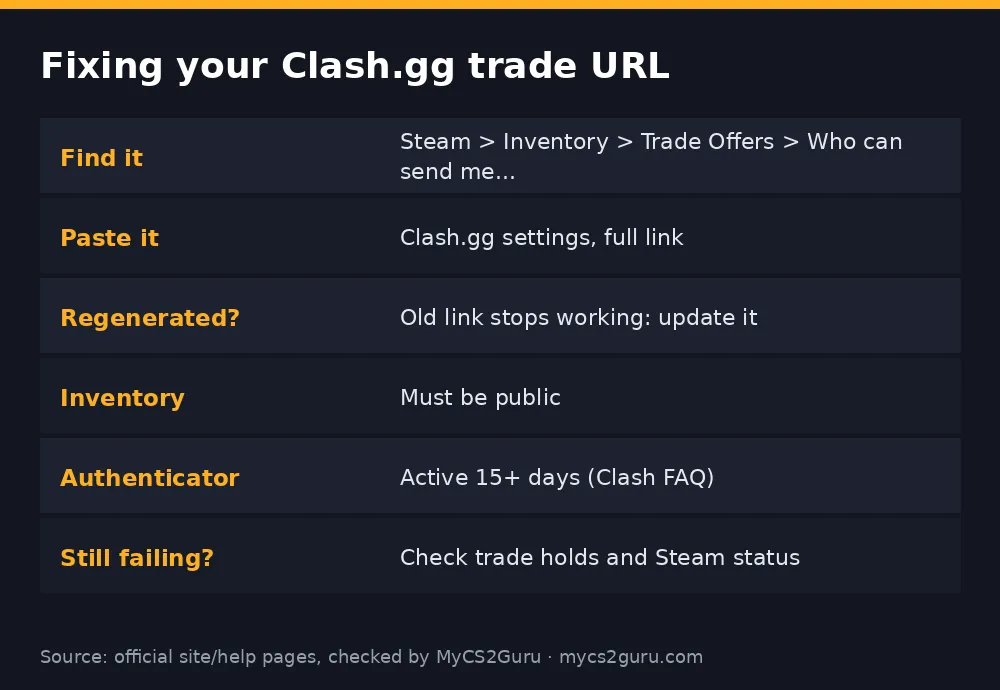
Step 2: Save it on Clash.gg
- Sign in to Clash.gg with the same Steam account.
- Open your settings/profile.
- Paste the full link into the trade URL field.
- Save, then refresh the page to make sure it stuck.
Step 3: Check the settings that break trades anyway
Even a perfect trade URL won't help if Steam blocks the trade.
| Setting | What it should be | Why |
|---|---|---|
| Inventory privacy | Public | Clash.gg needs to see items for deposits |
| Steam Guard Mobile Authenticator | Active more than 15 days | Clash.gg's FAQ says trades won't go through otherwise |
| Recent password reset | None recently | Can trigger Steam trade holds |
| New device login | Not right before trading | Can trigger holds |
| Steam status | Up | Tuesday maintenance can stall trades |
Common causes and fixes
| Symptom | Likely cause | Fix |
|---|---|---|
| "Invalid trade URL" | Incomplete or mistyped link | Copy again with the Copy button |
| Worked before, now fails | You clicked "Create new URL" in Steam | Paste the new link into Clash.gg |
| No trade offer arrives | Wrong account's link | Use the URL from the account you signed in with |
| Inventory empty on deposit | Private inventory | Set inventory to public, wait a few minutes |
| Trade goes on hold | Authenticator under 15 days or security change | Wait until the hold clears |
| Deposit cancelled | Clash.gg can't trade with a held account | Cancel and retry after 15+ days of authenticator |
Why regenerating your trade URL matters
Steam lets you create a new trade URL at any time. That's a useful security feature: if you think a scammer has your link and is spamming you with junk offers, you can kill it. But it also invalidates the old link everywhere, including on Clash.gg. If you've regenerated it, even months ago, update every site you use.
Trade URL vs API key: don't mix them up
Your trade URL is safe to share with sites you trade on; it only lets people send you offers. Your Steam Web API key is completely different and should never be shared. Scammers who get your API key can cancel real trades and send lookalike offers from fake profiles. If any site or "support agent" asks for your API key, it's a scam. If you've ever entered it somewhere, revoke it in Steam. More: CS2 trading scams.
Testing your trade URL
Not sure whether the link works? Open it in a browser while logged in to a different Steam account, such as a friend's: it should open a trade offer window addressed to you. If it errors or opens someone else's profile, it's wrong. Alternatively, start a small deposit on Clash.gg with one cheap skin. If the trade offer arrives in your Steam app, everything's set up correctly, and you can move on to bigger deposits with confidence.
Mobile tips
On mobile, the Steam app's trade offer screen is where you'll accept trades, and confirmations happen in the Steam Guard section. Copying the trade URL is easier from the Steam website in your phone's browser: open your inventory, go to trade offers and the privacy settings, and use the copy button. Then paste it into Clash.gg in the same browser. Avoid copying it from screenshots or retyping it.
When it's not your trade URL at all
Sometimes the problem is on Steam's side. Steam's weekly Tuesday maintenance and occasional outages stall trades for everyone. If your link and settings are all correct and nothing works, check Steam's status before changing anything. Other times the issue is with the specific item: trade-locked items or items recently received under trade protection can't be deposited until their lock clears. If a single skin fails while others work, that's the likely reason.
Quick fix checklist
Copy a fresh trade URL with the Copy button. Paste it into Clash.gg while signed in with the same Steam account. Set your inventory to public. Make sure the Steam Guard Mobile Authenticator has been active for more than 15 days. Avoid trading right after a password reset or new-device login. Check Steam's status. Retry. That sequence fixes almost every trade URL problem.
Why Clash.gg needs your trade URL at all
Steam only lets someone send you a trade offer if they're your friend or they have your trade URL. Sites don't add you as a friend, so the trade URL is how deposit and withdrawal offers reach you. That's why every skin site asks for it, and why a missing or outdated link makes trades silently fail.
18+ only. Clash.gg isn't available in Idaho, Michigan, Montana, Nevada or Washington and some other regions. See our responsible gambling page.