Clash.gg Stash: How to Use the CS2 Skin Database Like a Pro
Updated · By the MyCS2Guru Editorial Team
Who Stash is for
- Casual players: check what your inventory's worth and what a skin costs before buying.
- Clash.gg players: sanity-check targets and drops.
- Traders: volume and sale history for decisions.
- Case Hardened collectors: the pattern database is the main draw.
Worked example: did I just unbox something good?
Say a Case Hardened AK drops from a case on Clash.gg.
- Note its wear on the item card (e.g. Field-Tested).
- Withdraw it, then inspect it to read the pattern seed (say, seed 512).
- On Stash, open Search Pattern, pick AK-47, enter 512 and the FT float range.
- Sort sales by date to see recent prices for that seed.
- Compare with the normal FT Case Hardened price on the skin page.
If seed sales are close to normal prices, it's a regular pattern; do whatever you like with it. If they're way above, you've got something special. Get quotes from pattern-aware buyers before trading it anywhere.
Using Stash before targeting an upgrade
- Pick your target skin and wear on Clash.gg's upgrader.
- Look up the same skin and wear on Stash.
- If Clash.gg's value is close to market, the chance shown reflects a fair target price.
- If it's much higher than market, consider a different target or just buy it.
Stash vs other price sources
| Source type | Strength | Weakness |
|---|---|---|
| Stash | Free, huge database, Case Hardened pattern tools | Estimates for rare patterns are rough |
| Steam Community Market | Official listings | Includes Steam fees; prices can sit above third-party markets |
| Third-party marketplaces | Real trade prices | Each site's prices differ |
| Gambling site item values | What that site pays/charges | May ignore patterns and stickers |
Best practice: check Stash, then compare with at least one real marketplace for anything expensive.
Five Stash habits that save money
- Check the wear before the name. A Field-Tested and a Factory New can be 5x apart.
- Look at volume. Low-volume items are harder to sell at the listed price.
- Check StatTrak and souvenir separately. They're priced as different items.
- Use pattern search for every Case Hardened. Most are normal; checking costs nothing.
- Recheck before big trades. Prices move, especially after updates and new cases.
What Stash can't tell you
- What a specific buyer will pay for a rare pattern or sticker combo.
- Future price movement after game updates.
- Whether a trade offer you received is a scam (that's on you to check).
For scam patterns, see CS2 trading scams.
Quick reference
| Question | Answer |
|---|---|
| URL | stash.clash.gg |
| Cost | Free |
| Best feature | Case Hardened pattern search |
| Inventory values | inventory.clash.gg |
| Trades | Clash.gg marketplace bots |
| Account needed? | Only for trading |
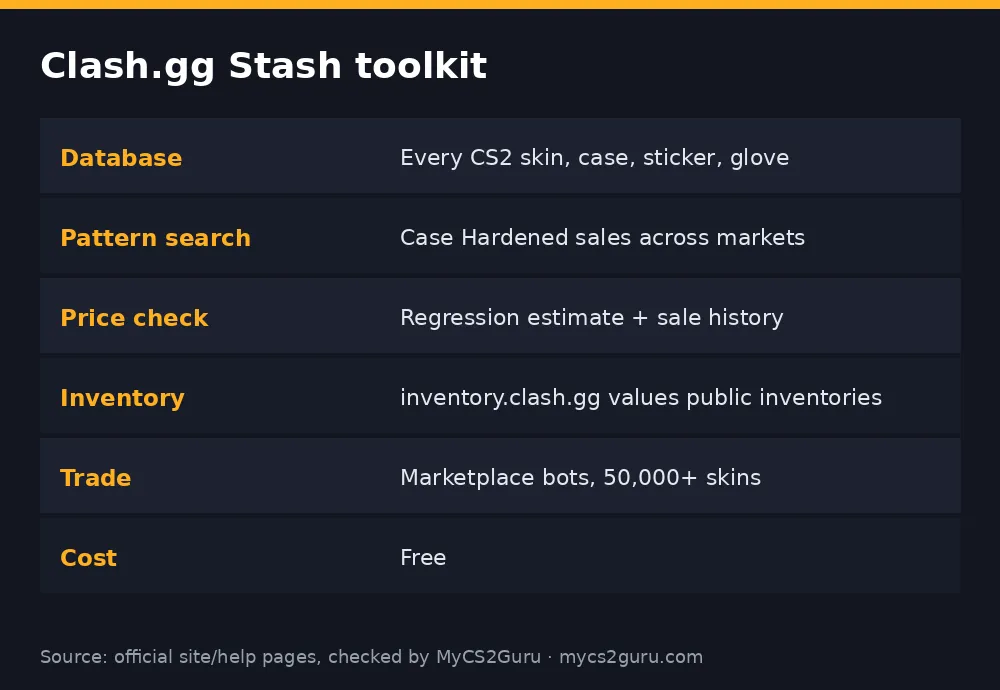
Before you open a case, target an upgrade or trade a skin, you want to know what things are actually worth, bro. That's what Clash.gg Stash is for. It lives at stash.clash.gg and it's one of the most complete free CS2 item databases around: every skin, case, knife, glove and sticker with prices and previews, plus serious tools for Case Hardened patterns. Here's how to use each part, and how it plugs into Clash.gg itself. For other price tools, see our CS2 skin price checker guide.
What's inside Stash
| Tool | What it does | Use it for |
|---|---|---|
| Skin database | Browse all CS2/CS:GO items with previews, rarity, wear ranges and prices | Checking value before you target or trade |
| Pattern search | Search hundreds of thousands of Case Hardened sales | Pricing blue gems and patterns |
| Price check | Regression-model estimate for Case Hardened items | A starting point for valuations |
| Volume | Sale volume analysis | Judging how liquid an item is |
| Sticker tools | Sticker previews and a composer | Planning crafts |
| Inventory calculator | Values public Steam inventories (inventory.clash.gg) | Knowing what your stash is worth |
| Marketplace trade | Swap skins with Clash.gg's bot inventory | Instant trades |
Step-by-step: price-checking a skin
- Open stash.clash.gg.
- Search the weapon or skin name, or browse by category.
- Open the skin page to see wear ranges, prices per wear, StatTrak/souvenir availability and listings.
- Pick the exact wear you care about; prices can differ hugely.
- Compare with a second source if it's a big purchase.
Step-by-step: checking a Case Hardened pattern
- Go to Search Pattern.
- Choose the item (e.g. AK-47, Karambit, Five-SeveN).
- Enter the pattern seed and optionally a float range or wear.
- Filter by origin (sale sources like Buff, CSFloat, Skinport and others are listed) and date range.
- Sort by price, float, top blue or magazine blue percentage.
- Review past sales for that seed and similar ones.
That's how you find out if the Case Hardened you just unboxed is ordinary or worth a trip to a pattern-aware buyer. More context: Clash.gg blue gem guide.
Use What You Learn on Clash.gg
Using the price check model properly
Stash's price check uses regression models trained on sale history to estimate Case Hardened values. The tool itself is upfront about its limits:
- It's most accurate for cheaper patterns in Field-Tested.
- Few sales = bigger margin of error.
- It shows the sale history underneath so you can sanity check.
| Situation | How much to trust the estimate |
|---|---|
| Common seed, FT, many sales | Fairly reliable |
| Uncommon seed, few sales | Rough guide only |
| Tier 1 blue gem | Treat as a starting point; get real quotes |
Inventory calculator
At inventory.clash.gg you can log in with Steam or enter a nickname/Steam ID to value a public inventory. You get an itemised list with prices and a total, plus the option to compare with friends' inventories. Handy before a trade, or just to see what your loadout's worth. Our CS2 inventory value guide covers other calculators too.
Marketplace trades
Stash connects to Clash.gg's marketplace, where you can trade skins from your Steam inventory for skins from the site's bot inventory (it advertises 50,000+ items). If values don't match, your balance fills the gap: swap a $20 skin for a $20 skin, add $10 balance to a $10 skin for a $20 one, or trade down and get balance back. Setup needs a public inventory, a trade URL and a verified email.
How Stash helps on Clash.gg itself
| On Clash.gg you're... | Check on Stash |
|---|---|
| Targeting an upgrade | Market price of the target skin |
| Opening a case | Value of the items you'd actually want |
| Withdrawing a skin | Whether its market value matches what you expect |
| Holding a Case Hardened | Its pattern seed's sale history |
Upgrader and case chances are calculated from Clash.gg's own item values, so knowing market prices helps you spot where a target's value sits.
Troubleshooting
| Problem | Fix |
|---|---|
| Prices in the wrong currency | Look for the currency selector on the site; it may default to your region |
| Pattern search shows no sales | Rare seed; widen float/date range |
| Inventory won't load | Make your Steam inventory public |
| Price estimate looks odd | Check the sale history below it |
18+ for Clash.gg itself. Stash is free to browse for anyone; gambling isn't required. See our responsible gambling page.