How to Redeem a Code on Clash.gg (Every Code Type)
Updated · MyCS2Guru crew
Half the "my code doesn't work" posts about Clash.gg are just the code going in the wrong box, bro. Clash.gg has a few kinds of codes and each one lives somewhere different. Here's how to redeem a code on Clash.gg for every type, plus the fix list for errors. For which code to use in the first place, the Clash.gg promo code page is the full guide.
claim free cases on Clash.gg through our link
Code type 1: promo / affiliate codes
These are creator and site our referral link.
- Sign in with Steam.
- Go to Rewards.
- Find the affiliate/promo code field.
- Type the code, hit claim.
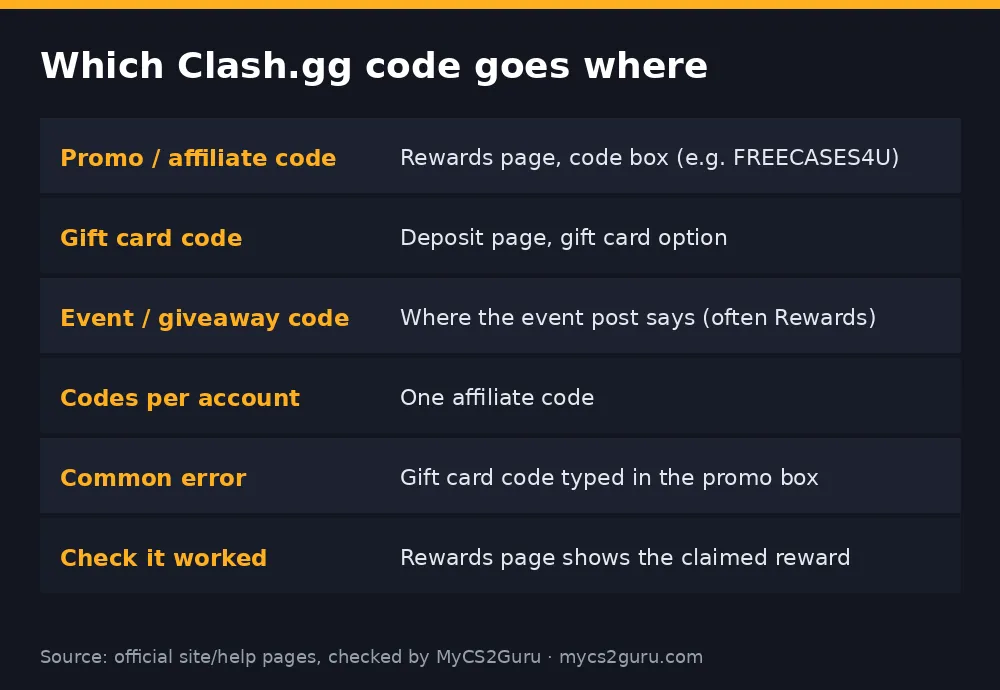
One affiliate code per account. If you already used one at signup, a second won't take.
Code type 2: gift card codes
Bought a Clash.gg card on Kinguin, G2A or another key shop? That code is not a promo code. It goes on the deposit page under the gift card option. Paste it there and the value hits your balance. Typing it in the Rewards box will just throw "invalid". Buying tips are in our Clash.gg gift card on Kinguin page.
Code type 3: event and giveaway codes
Clash.gg and partners drop codes during events, streams and social giveaways. These usually have limited uses and short expiry times. Redeem them wherever the post tells you, usually Rewards. If one fails, it's often simply used up.
"Invalid code" fix list
| Error cause | Fix |
|---|---|
| Typo | Retype slowly; our link has a 4 |
| Wrong box | Gift cards = deposit page; promo codes = Rewards |
| Account already has an affiliate code | Only one allowed; contact support if needed |
| Expired event code | Nothing to do; they're time-limited |
| Region / location | Clash.gg isn't available in every location |
| Session issue | Log out, log back in via Steam, refresh |
Coupon sites: careful
Search "clash gg redeem code" and you'll land on coupon aggregators listing dozens of codes. Most are recycled, expired or just other people's affiliate codes with made-up rewards attached. A good test: does the page say exactly what the code gives and when it was checked? If not, skip it. Reddit threads are similar; see our Clash.gg codes on Reddit page for how to sort the good from the junk.
After you redeem
- Open the free cases from the cases page.
- Check Rewards for the free daily case (after KYC) and rakeback timers.
Quick safety note
Never paste a code into a site that isn't clash.gg, and never give anyone your Steam login or API key to "activate" a code. Real codes just need the box on Clash.gg.
Step-by-step with screenshots in words
Here's exactly what you'll see, bro, so you know you're in the right place:
- Top bar: your balance and profile icon once signed in.
- Menu: open it and look for Rewards. On desktop it's in the main navigation; on mobile it's under the hamburger menu.
- Rewards page: you'll see rakeback timers, daily case info and a field for an affiliate/promo code.
- Code field: type the code, then press the claim/apply button next to it.
- Confirmation: the free cases appear and the code shows as applied.
For gift cards, go to the deposit page instead and choose gift card. You'll see a separate field for the card code.
What each code type gives
| Code type | Example | What you get | Deposit needed? |
|---|---|---|---|
| Gift card | Kinguin/G2A gem or USD key | Balance equal to card value | Card is the payment |
| Event / giveaway | Limited code from a stream or post | Whatever the event offers | Usually no |
Code etiquette: one per account, no multi-accounting
Clash.gg allows one affiliate code per account. Making extra accounts to claim more welcome cases breaks the terms and can get accounts closed, often at the worst moment (like when you try to withdraw). One account, one code, done.
Redeeming on the right domain
Phishing sites copy Clash.gg's look and even its code box. Before entering anything:
- Check the address bar says clash.gg.
- Check that the Steam login window is on steamcommunity.com.
- Never enter your Steam password on a page that isn't Steam.
- Never share your Steam API key with anyone.
If you think you logged in on a fake, change your Steam password, revoke your API key in Steam settings, and deauthorise other devices.
After redeeming: next steps
- Open your free cases.
- Look at the Rewards page timers so you know when rakeback resets.
- If you want the daily free case, complete KYC.
More free value is covered in Clash.gg free gems.
Codes from YouTube and Twitch
Creators often show a code on stream or in a video description. Those are usually normal affiliate codes, the same type as our link, giving a similar welcome reward. Event codes dropped live during a stream are different: limited uses, short life. If you're too late, it's gone. Don't trust "code in the comments" replies from accounts that aren't the creator; that's where phishing links hide.
18+ only. If you're spending more than you planned, take a break; see our responsible gambling page.