CSGOEmpire Auction: How to Bid Smart and Grab Skins Below List Price
Updated · By the MyCS2Guru Editorial Team
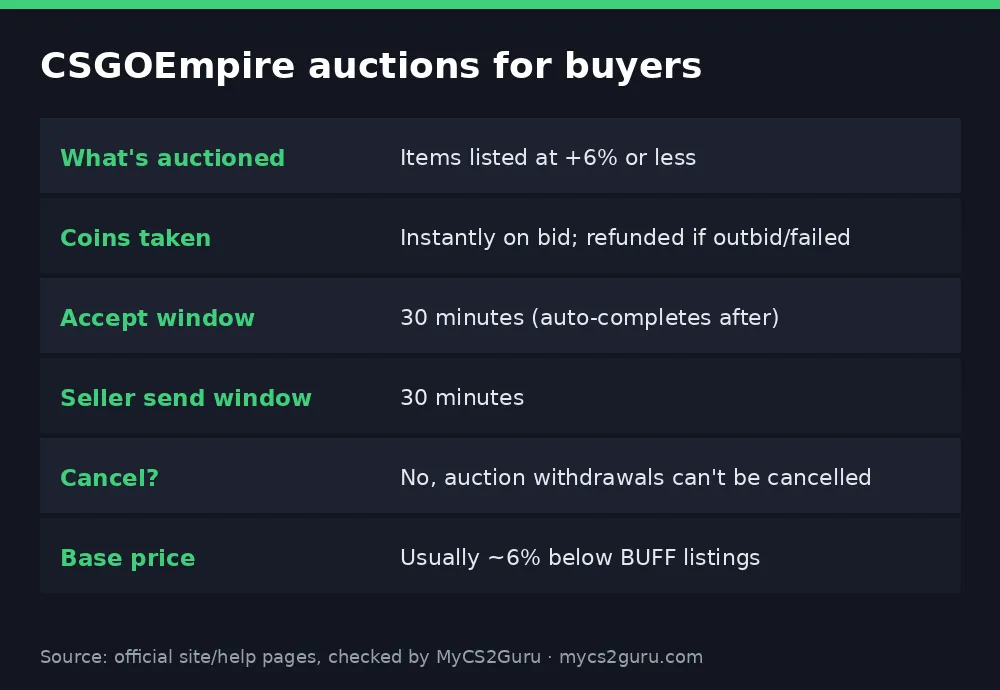
Auctions are where the deals live on CSGOEmpire, bro. Sellers who price near base let buyers bid, and if you're quick and disciplined you can grab skins below what they'd cost on the withdraw page. But auctions have strict rules: coins leave your balance the moment you bid, you can't cancel, and you get just 30 minutes to accept. This page is the buyer's guide to CSGOEmpire auctions. Selling instead? See the CSGOEmpire marketplace guide.
Claim Free Case, Then Start Bidding
How auctions work (buyer view)
| Step | What happens |
|---|---|
| 1. Listing | Seller lists at +6% or less over base → item goes to auction |
| 2. Bidding | Buyers bid in Empire Coins; coins are removed instantly |
| 3. Outbid? | Your coins come back |
| 4. Win | Seller has 30 minutes to send the Steam trade |
| 5. Accept | You have 30 minutes to confirm or dispute on site |
| 6. Done | No action in 30 minutes = auto-marked completed |
Items listed above +6% skip auction and go straight to the withdraw page at a fixed price.
Understanding base price
Empire builds prices from other marketplaces, mainly BUFF, using buy orders and listings. By default, its price is usually around 6% below the BUFF listing price, though it varies for low-demand items. That's why auctions near base can be good value: you're starting below BUFF and bidding up from there.
| Item listed at | Route | Buyer impact |
|---|---|---|
| Base or below | Auction | Best chance of a deal |
| +1% to +6% | Auction | Still competitive |
| Above +6% | Withdraw page | Fixed price, no bidding |
Step-by-step: winning your first auction
- Sign up with FREECASES4U and open your free case.
- Set up Steam: Steam Guard Mobile Authenticator on, trade URL saved, inventory public.
- Turn on Trade Tracking and notifications (Empire supports Telegram or Discord alerts).
- Open Withdraw and filter for auction items.
- Check the seller signals: online indicator, delivery rate and delivery time.
- Decide your max bid before bidding; don't get drawn into a war.
- Bid. Coins leave your balance instantly.
- If you win, stay online and accept the trade within 30 minutes.
- Verify the item in the trade matches the site details before confirming in Steam.
Seller signals that matter
| Signal | Good sign | Bad sign |
|---|---|---|
| Online indicator | Online (active in last 10 min or using a listing bot) | Offline |
| Delivery rate | High completion over last 10 and 100 | Missed trades |
| Delivery time | Fast average | Long average |
Auctions demand both sides be online. An offline seller is a red flag for a 30-minute window.
Bidding strategy
- Set a ceiling at or below what the item costs on the withdraw page or elsewhere.
- Factor in BUFF prices. If you'd pay more than the BUFF listing, why bid?
- Bid late, not emotionally. Last-second bids can win, but only up to your ceiling.
- Don't spread your balance across many bids you can't accept in time.
- Watch float and stickers. Two "same" skins can have different values.
Auction vs withdraw page
| Auction | Withdraw page | |
|---|---|---|
| Price | Bid; can be below list | Fixed |
| Speed | 30-min windows each side | 12-hour windows each side |
| Cancel | Never | Sometimes after 30 min if unsent |
| Best for | Deals, if you're online | Convenience |
Trade protection on auction items
Since Steam made trades reversible for 7 days, items you buy can be equipped and used, but not traded, sold, consumed or modified during the protection window. Sellers wait up to 8 days for coins. If a trade gets reversed, Empire holds funds and treats it as a dispute; reversers are permanently banned. Background: CS2 trade hold explained.
Trade punishments
Failing to complete an auction trade in the 30 minutes you're given leads to a trade punishment. That applies to sellers who don't send and is a reason buyers should bid only when they can respond. Don't bid right before you go offline.
Troubleshooting
| Problem | Fix |
|---|---|
| Coins disappeared after bidding | Normal; returned if outbid or trade fails |
| Can't cancel | Auction withdrawals can't be cancelled |
| Seller didn't send | Wait out the 30 minutes; coins return if it fails |
| Trade looks different | Dispute on site; don't accept in Steam |
| Item locked after receiving | Trade protection window |
Notifications: never miss a 30-minute window
Empire supports Telegram or Discord notifications, so you get pinged when you win an auction or a seller sends the trade. Set them up before you bid. Combine that with the Steam mobile app for confirming trades and you can handle auctions from your phone.
Auction etiquette and safety
- Only accept the trade that matches the site's item details, from the user Empire shows.
- Watch for API key scams: a fake trade appears that looks identical but goes to a scammer. Never share your Steam API key; revoke any you didn't create.
- Ignore DMs from "sellers" asking to complete the deal off-site.
- If something's off, dispute on site rather than accepting in Steam.
More: CS2 trading scams.
Worked example
You have 100 coins. You bid 50 on an AK auction. Your balance shows 50 straight away. You win: the seller sends within 30 minutes, you accept within 30 minutes, you keep the AK and 50 coins. If someone outbids you or the trade fails, the 50 coins come back and you're at 100 again. That's straight from Empire's help-centre example.
How to spot a genuine deal
- Check the item's base price on Empire.
- Compare with BUFF or another market.
- Check float and stickers in the item details.
- Set your max at a price you'd be happy with after considering the 8-day protection lock.
- Only bid on items from responsive sellers.
Quick reference
| Question | Answer |
|---|---|
| Auction threshold | Listed at +6% or less |
| Coins taken | On bid |
| Accept window | 30 min |
| Cancel | Not possible |
| Base price | ~6% below BUFF listing |
| Free start | FREECASES4U |
Auctions and instant credit (seller side, briefly)
Why do some sellers list near base for auctions? Speed. Auction trades complete within 30-minute windows, and sellers with instant credit get coins straight away up to their limit instead of waiting up to 8 days. For buyers, that means the auction pool is full of motivated sellers. Instant credit explained: CSGOEmpire instant deposit.
Auction mistakes buyers make
| Mistake | Better habit |
|---|---|
| Bidding then going AFK | Bid only when you can stay 30+ minutes |
| Overpaying in a bidding war | Fixed ceiling before you bid |
| Ignoring seller stats | Prefer online sellers with high delivery rates |
| Accepting without checking | Match item, wear and seller every time |
| Forgetting the protection lock | Expect up to 7 days before you can trade it on |
Who should use auctions
- Active players who are online and can accept within 30 minutes.
- Deal hunters comfortable checking BUFF prices and floats.
- Not ideal for people who want to click buy and walk away; the withdraw page suits them better.
18+ only. CSGOEmpire isn't available in the US, UK, Australia and other restricted countries. See our responsible gambling page.