CS2 Skin Gambling Sites With Steam Login: How It Works and How to Stay Safe
Updated · By the MyCS2Guru Editorial Team
Almost every CS2 skin site uses "Sign in through Steam", bro, and that's a good thing when it's real. It also happens to be the single most copied page in skin-gambling scams. This page explains how Steam login works on CS2 gambling sites, what Clash.gg and CSGOEmpire can actually see, and how to make sure the login page in front of you is genuine. If you landed here asking "is Clash.gg safe to log in with Steam?", the short answer is yes, through the official Steam page, and the details are below.
Sign In to Clash.gg With Steam
How "Sign in through Steam" works
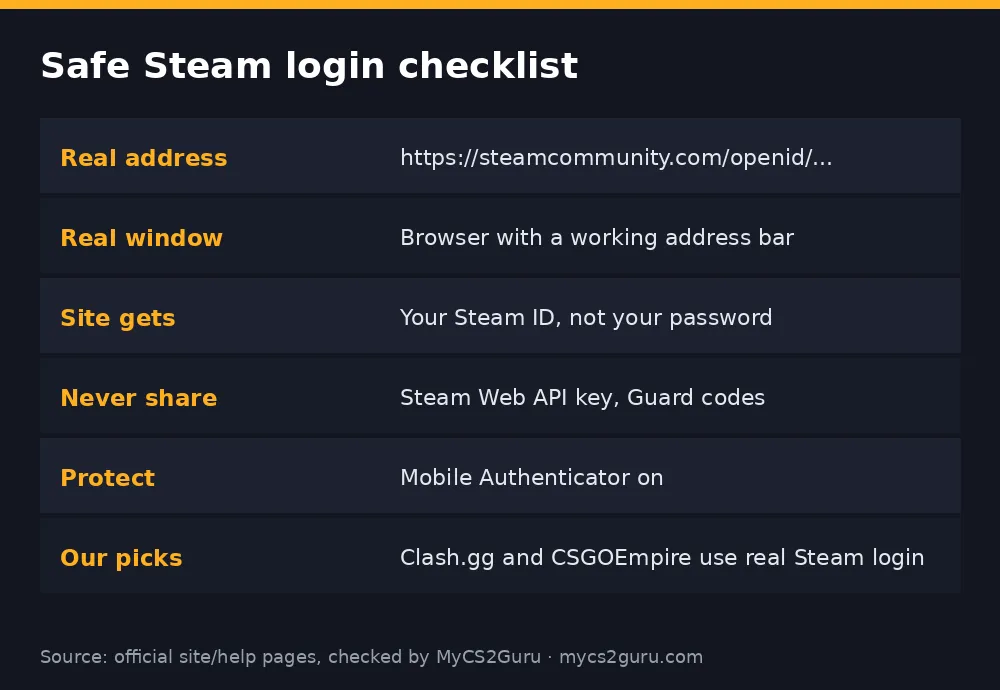
When you click Sign in on Clash.gg or CSGOEmpire, you're sent to Steam's own website to log in. Steam checks your password and Steam Guard code, then tells the site "this person controls Steam account X". The site never sees your password. It receives your Steam ID and can read your public profile details, like your name, avatar and, if public, your inventory.
| Site gets | Site does NOT get |
|---|---|
| Your Steam ID | Your password |
| Public profile info | Your Steam Guard codes |
| Public inventory (if set public) | The ability to trade without your confirmation |
| Proof you control the account | Your email or payment details from Steam |
Trades still need you to accept and confirm them in the Steam app. That's why real Steam login on a legit site is safe.
Is Clash.gg safe to log in with Steam?
Yes, as long as you're on the real clash.gg and the login window is Steam's own page. Clash.gg uses Steam sign-in for accounts, and skin deposits and withdrawals happen through normal Steam trade offers you accept yourself. The risks people worry about don't come from Clash.gg's login; they come from fake copies of Clash.gg or of Steam's login page, and from API key scams. Type clash.gg yourself or use a bookmark, and follow the checklist below. More on the site itself: Clash.gg review.
CSGOEmpire and Steam login
CSGOEmpire works the same way: Steam sign-in, then trades through Steam. Empire also offers its own 2FA option on top, which reviewers recommend turning on straight away. Watch for lookalike domains that swap a letter in "csgoempire". Guide: CSGOEmpire review.
How fake Steam login pages work
The most common trick is a fake pop-up window drawn inside a web page. It looks exactly like a Steam login window, with a fake address bar showing steamcommunity.com. Because it's just part of the page, you can't actually click into or drag the "address bar", and it can't leave the original browser window. Enter your details and they go straight to a scammer, who logs in, approves trades with your codes and empties your inventory.
How to check:
- Try to drag the login window outside the browser. Real windows can move freely; fake ones are stuck inside the page.
- Click the address bar. A real one lets you select the text.
- Check the domain is exactly steamcommunity.com.
- If unsure, close it and log in to Steam directly in a new tab first; real sites then just ask you to confirm.
The API key scam
Your Steam Web API key lets software read and manage your trade offers. Scammers who get it can watch for your real trade, cancel it instantly and send a near-identical offer from a fake profile, so you accept a trade to the wrong person. Legit skin sites don't need your API key. If a site asks you to paste it, or you ever did, go to Steam's API key page and revoke it. Then check your trade offers carefully from now on. More: CS2 trading scams.
Safe login checklist
| Check | Why |
|---|---|
| Typed the site address or used a bookmark | Avoids lookalike domains |
| Login window shows steamcommunity.com | Confirms it's Steam |
| Window can be dragged outside the page | Rules out fake pop-ups |
| Steam Guard Mobile Authenticator on | Stops password-only logins |
| Never shared API key or Guard codes | Blocks the two biggest scams |
| Trades checked before confirming | Catches lookalike offers |
Steam login vs email sign-up
Some casinos use email and password accounts. For CS2 sites, Steam login makes more sense: the site needs to know your Steam account to trade skins with you anyway, you don't create yet another password, and Steam's security (including the Mobile Authenticator) protects the account. The trade-off is that your Steam account becomes the key to everything, so its security matters more than ever. A strong unique password, Mobile Authenticator, and a safely stored recovery code are non-negotiable.
What to do if you think you've been phished
Act fast. Change your Steam password immediately from a trusted device. In Steam Guard settings, deauthorise all other devices, which logs out the scammer. Revoke your Steam Web API key if one exists that you didn't create. Check your trade offers and trade history for anything you don't recognise. If items were stolen, Steam support can sometimes help, but recovery isn't guaranteed. Then contact the skin site's support if your balance or trades there might be affected. Finally, scan your computer for malware, since some phishing comes with password-stealing extensions.
Browser extensions and fake tools
Another route scammers use is browser extensions that promise price checking, trade helpers or "free skins". Some read your Steam session or inject fake trade windows. Install only well-known extensions, keep the list short, and remove anything you don't use. The same goes for downloadable "bots" or "predictors" for gambling sites: they're often malware.
Using both sites safely
If you play on both Clash.gg and CSGOEmpire, the same Steam account works for both. Keep one trade URL saved on each site, use the same safe login habits, and be extra careful with links from Discord, YouTube comments and DMs. The simplest rule: only ever reach a gambling site by typing its address or using your own bookmark. Compare the two sites: Clash.gg vs CSGOEmpire.
Red flags on any skin site
A site that asks for your Steam password on its own page, rather than sending you to Steam. A site that asks for your API key. A "support agent" in DMs asking you to verify your account by logging in through a link. A giveaway that requires logging in to claim. Trade offers that appear seconds after a real one, from a profile with the same name and avatar. Any one of these is enough reason to stop and close the tab.
The bottom line
Steam login itself is safe and the right way for CS2 sites to work. The danger is fake copies of the login and of the sites themselves, plus API key scams. Reach Clash.gg and CSGOEmpire by typing the address, confirm the login is on steamcommunity.com in a real window, keep the Mobile Authenticator on, and never share your API key. Do those four things and you've shut the door on almost every skin scam out there.
18+ only. Clash.gg isn't available in Idaho, Michigan, Montana, Nevada or Washington; CSGOEmpire isn't available in the US, UK, Australia and other restricted countries. See our responsible gambling page.